software | projects | photos | archive | about | contact | subscribe  RSS

Home > Software > Mugshot

Mugshot

Delicious Reddit Digg Facebook StumbleUpon Twitter

Mugshot is a home security application that uses a digital camera or webcam to detect motion in your home. If an intruder, burglar or even nosy housemate is seen, a snapshot is taken and emailed to you. So, should the thief steal your PC or laptop computer, you can still take the pictures of the perpetrator to the police for identification and provide evidence of the crime to authorities and insurers. This is a method of crime-prevention that has had well-publicised successes.

Version 3 (released 27/01/07)

  • Various bug fixes

Version 2 (released 28/10/06)

  • Display at 640x480 resolution
  • Trial version limited by watermark on images rather than being time-limited

New versions largely come about because of all the feedback I've received, so I'd like to thank all those who submitted suggestions, sent me encouraging emails and, of course, the small team of beta-testing ninjas. Once again, any feedback is much appreciated, requests for new features (as well as ideas for new software projects too) are most welcome.

You might also be interested in using a webcam for time lapse, 3d models, tracking and/or long exposure.

Requirements:

A computer, an internet connection, an image capture device such as a digital camera or webcam (Mugshot can automatically detect and work with most image capture devices), and an email address to send and receive the captured pictures of any detected intruders.

FAQs:

Q1: What limitations are there in the trial version?
Q2: How much does Mugshot cost to buy?
Q3: How sensitive is Mugshot when it comes to detecting motion?
Q4: How large are the picture attachments Mugshot sends?
Q5: Does my computer have to be fully on when using Mugshot or can I let it hibernate?
Q6: Where's should I position the digital camera or webcam?
Q7: I don't have a webcam... Is my digital camera compatible with Mugshot?
Q8: What email address should I use for my "From" email?
Q9: What email address should I use for my "To" email?
Q10: What's my SMTP server address?
Q11: How good is the face detection mode?
Q12: What else could I use Mugshot for?
Q13: I can't send emails! I'm sure my SMTP address is correct...
Q14: This almost does what I want. Can I pay for some bespoke changes to be made?

Q1: What limitations are there in the trial version?
A1: For users without a license, images taken by Mugshot will have a watermark imprinted on them.

Q2: How much does Mugshot cost to buy?
A2: Version 3.x costs $8 for new users. For those license holders upgrading from V1.0 or V1.1 it's half price.

Note: Licenses for earlier versions are not recognised by version 2.0. (Please also read the notes on the column to the right if you intend to purchase Mugshot.)

Q3: How sensitive is Mugshot when it comes to detecting motion?
A3: As long as the area under surveillance area is well lit and the moving object can be perceived by the human eye in the capture window then Mugshot will see it. Clearly, any television or washing machine in operation that can be seen by the camera will not help Mugshot detect burglars. These can cause false alarms, resulting in unwanted emails alerting you to a non-existent intruder. Pets allowed to roam within the area under surveillance may also give rise to false positives.

Q4: How large are the picture attachments Mugshot sends?
A4: This depends on the resolution of the webcam. The pictures are compressed to Jpeg format which is ideal for photos in that it preserves fidelity but is also drastically smaller in size compared to other formats such as bitmaps (Bmp). A standard webcam resolution is 320x240 pixels and the typical filesize of such a photo would be of the order of 20KB.

Q5: Does my computer have to be fully on when using Mugshot or can I let it hibernate?
A5: Mugshot requires your PC desktop or notebook to be fully powered during the entire surveillance period. It is, therefore, recommended that monitors are set to power down automatically when not in use for energy saving purposes. Unfortunately there is no known method of hibernating a PC and also have software of any kind to run at the same time without some external trigger to wake the computer and perform its surveillance task.

Q6: Where should I position the digital camera or webcam?
A6: Research has shown that a person's face must reasonably take up at least 20-25% of the camera capture window's height before it is recognisable. With this in mind it is recommended that the digital camera or webcam is positioned at or slightly below eye level and pointed to where a burglar is most likely to go in the room under surveillance. Besides the computer, which the camera is connected to, it could be pointed towards the door, TV, hi-fi or other valuable equipment. A well lit area is recommended but not in direct sunlight. If surveillance is to occur overnight then it is necessary to leave a light shining on the main area under surveillance.

Q7: I don't have a webcam... Is my digital camera compatible with Mugshot?
A7: The mode most cameras default to when plugged into a computer's USB port is "Transfer Photo" mode, used to transfer snaps onto your computer. Most digital cameras do however also have "PC Cam" mode which lets you use it as a webcam.

Q8: What email address should I use for my "From" email?
A8: Your "From" email is the email address Mugshot uses to send surveillance photos. This email should be the one you use base your email application (such as Outlook, Thunderbird) around and regularly use to send and receive email. Web-based email addresses such as those obtainable from Hotmail, Yahoo, AOL etc unfortunately will not allow remote sending of emails.

Q9: What email address should I use for my "To" email?
A9: Your "To" email is the email address with which you will receive the surveillance photos. It is strongly recommended that this is NOT the same address from which you send the captured image(s). This is in case the burglar steals your PC, runs your email application and receives all your emails! Email providers such as Hotmail, Yahoo, AOL and GMail are web-based, so accessible from anywhere, password protected and therefore ideal for setting as a "To" email address.

Q10: What's my SMTP server address?
A10: An SMTP server is the server responsible for sending your emails. Its address is also required by Mugshot so that it can send emails with the "From" address. You should be able to find it set in your email application somewhere under Options or Settings. Alternatively, ask your Internet Service Provider (ISP) who will readily tell you or look on their website. It usually takes the form of "smtp.[your ISP's domain name].com" or "mail.[your ISP's domain name].com".

Q11: How good is the face detection mode?
A11: Not bad. In face detect mode (as opposed to motion detect mode) Mugshot was able to recognise my face even when I was wearing a hat and wraparound sunglasses. The benefit of face detection is that a picture is taken only when a face is in view, whereas in motion detect mode this is not always the case. This mode can however yield false positives, i.e. my bookcase has been classified as having a face in testing before... For this reason, in face detect mode, there is a limit to the number of pictures Mugshot will take and email during one surveillance session (currently 40).

Q12: What else could I use Mugshot for?
A12: Find out the hunting habits of your cat? Find out if you sleep walk? For these applications where there's no risk of your PC being stolen, you can run Mugshot without it sending emails. The pictures are stored locally in the folder where you run Mugshot from.

Q13: I can't send emails! I'm sure my SMTP address is correct...
A13: This is an authentication problem. Some SMTP servers require a username and address before they transport an email. Testing is still ongoing for a solution to this problem but I would greatly appreciate feedback telling me which SMTP servers are problematic. Update: I think the problem is because some ISPs block port 25. (Some will unblock the port for you though.) Please contact me for an experimental version that attempts to send authenticated emails.

Q14: This almost does what I want. Can I pay for some bespoke changes to be made?
A14: In short, yes. Contact us with details of what you need and we'll provide a quote.

Mugshot [comments]

download softwareDownload Now [Mirror]
Free download 1.6MB
[pad file]

($8 for new users)

($4 to upgrade from any previous version)

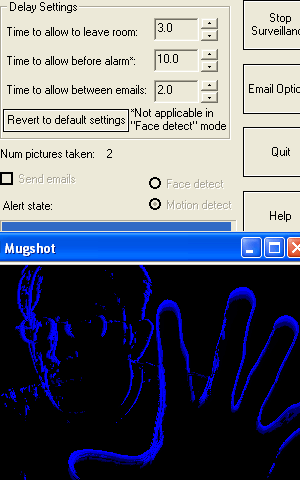
A Paypal account is not required to buy a license. Credit cards are accepted. Before completing your order please first read the instructions below the screenshot.

Screenshot:

Purchase via the "Buy Now" button above. This takes you to the Paypal website where you can pay $8. (Payment via credit card is also accepted by Paypal.) PayPal then immediately notifies our database that the transaction has taken place. Please then retrieve your license by going to this page with your Paypal transaction email address and the two lines of info obtained from the License Info button that pops up when you start Mugshot. This info contains your hard drive serial number and is used to encode the license. Note that the license, and therefore a fully functional version of Mugshot will only work on that one computer.

Problems? Try the FAQs first. Comments, like suggestions for the next version are very welcome.

Google Groups Beta
Subscribe to Mugshot
Email:
Visit this group

Tested webcams
Fuji Finepix
Philips SPC 900NC
Logitech QuickCam Messenger

***Discount webcams***
***Realtime auctions***

Related tags

, , ,