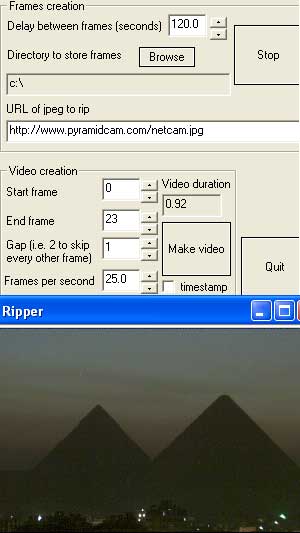
Ripper
Ripper is an application that periodically grabs online images to create time-lapse movies. (Nimisis.com also has software for making time lapse videos using your own webcam connected to your PC.) Pictures are taken from the specified online webcam every few seconds, minutes or hours (whatever the user decides), then they are merged together as frames in a time-lapse video. Some cool videos can be made this way. For example, do a time lapse of Loch Ness and get a pic of the famous Loch Ness Monster or timelapse the pyramids in Egypt.
FAQs
A1: Images and videos made with Ripper will have a watermark imprinted on them.
A2: Ripper costs $8. (Please also read the notes on the column to the right if you intend to purchase Ripper.)
A3: It will be an exact copy on the web image you ask it to tear off the internet.
A4: Ripper requires your PC desktop or notebook to be fully powered during the entire picture grabbing period. It is, therefore, recommended that monitors are set to power down automatically when not in use for energy saving purposes. Unfortunately there is no known method of hibernating a PC and also have software of any kind to run at the same time without some external trigger to wake the computer and perform its picture grabbing task.
A6: There are lots of online webcams available that work by updating an image that is displayed with the same filename. Satellite images also update frequently.
A7: The current settings can be found in the registry (Start->run->type "regedit"->click OK) They are listed under HKEY_LOCAL_MACHINE->SOFTWARE->Nimisis->Ripper.
- AUTO_START_DIR is the default directory to store the frames (important when using windows task scheduler to run up Ripper automatically). Make sure you use back slashes, i.e. C:\Program Files\Ripper\. The folder must exist before starting to grab frames.
- AUTO_START_FRAME_COUNT is a counter for the number of frames that have been saved using the scheduler. Users don't need to worry about this too much except that they should reset the counter to zero if starting a new recording using scheduler.
- AUTO_START_ON_OFF is a flag - 0 for normal use, 1 if intending to use Task Scheduler. Ripper then knows when it has to close itself down and increment the AUTO_START_FRAME_COUNT counter etc.
- URL is the web address of the image to capture.
A8: Use Windows Task Scheduler to set Ripper to run up when you want it to. As described in the previous question, set AUTO_START_ON_OFF to 1 and AUTO_START_FRAME_COUNT to 0. When you've captured all the frames, set AUTO_START_ON_OFF back to 0 (but leave AUTO_START_FRAME_COUNT to whatever value it's up to). The next time you run up Ripper you'll notice that the Make Video button is not greyed out. Press it to make your movie. Ripper then shuts itself down.
A9: There is a way! Say the most recent frame in your frames folder is pic_10478.jpg then you have 478 frames. Set the AUTO_START_FRAME_COUNT in the registry (described in Q9) to 478 and the AUTO_START_DIR to the folder that contains your jpgs. The "Make Video" button will be enabled the next time you start Ripper. Press it to make the video.
A10: If you find that you have too many frames or that the resultant video is going to be too long, you can skip every other frame by setting Gap to 2 and that will have the duration of the final time lapse film. If you only want every 5th frame to be in the movie then set Gap to 5. You get the idea.
A11: Here's a list to get you started.
A12: In short, yes. Contact us with details of what you need and we'll provide a quote.
Download Trial (.msi) Download Trial (.zip) Buy License for $5
A computer, an internet connection, and a video codec that will compress the final movie to a reasonable size.
Version 2.0
- More compatible websites found.
Screenshot