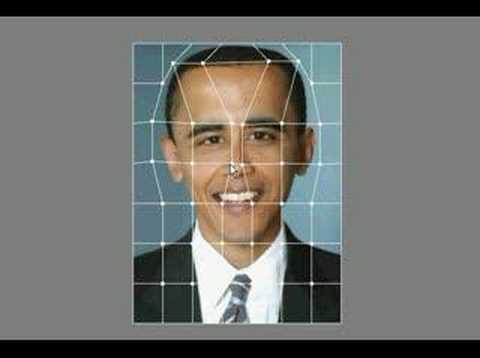
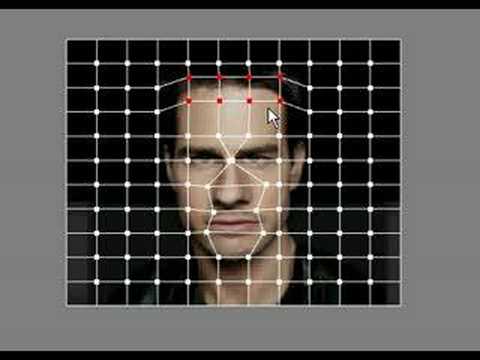
If you're asking yourself "How can I warp my photos to make amusing pictures?", then you've come to the right place. Warp is an application that enables you to warp pictures and morph images. Turn a photo of someone into a caricature by, say, enlarging their nose or by moving their eyes really close together. Manipulate their photo in an obvious way or very subtle way! You might also be interested in the fact that a good photo or two can earn you some extra cash!
Version 2.3 (released 29/01/08)
- Saving to Jpeg bug fixed
New versions largely come about because of all the feedback I receive, so I'd like to thank all those who submitted suggestions, sent me encouraging emails and, of course, the small team of beta-testing ninjas. Once again, any feedback is much appreciated, requests for new features (as well as ideas for new software projects too) are most welcome.
A computer (and a reasonably good graphics card helps).
Q1: How do I manipulate photos?
Q2: What limitations are there in the trial version?
Q3: How much does Warp cost to buy?
Q4: This almost does what I want. Can I pay for some bespoke changes to be made?
Q1: How do I manipulate photos?
A1: Select a point by left-clicking a box around one or more white control points. The control-point(s) will then go red. Drag with the right mouse button down to move the point(s).Q2: What limitations are there in the trial version?
A2: Images will have a watermark imprinted on them.Q3: How much does Warp cost to buy?
A3: Version 2.2 costs $5. (Please also read the notes on the column to the right if you intend to purchase Warp.)Q4: This almost does what I want. Can I pay for some bespoke changes to be made?
A4: In short, yes. Contact us with details of what you need and we'll provide a quote.
Warp [comments 4]
| Download Now [Mirror] Free download 1.6MB [pad file for download sites] |
A Paypal account is not required to buy a license. Credit cards are accepted. Before completing your order please first read the instructions below the screenshot.
Screenshot:

Purchase via the "Buy Now" button above. This takes you to the Paypal website where you can pay $5. (Payment via credit card is also accepted by Paypal.) PayPal then immediately notifies our database that the transaction has taken place. Please then retrieve your license by going to this page with your Paypal transaction transaction email address and the two lines of info obtained from the License Info button on the Purchase Warp dialog box that pops up when you start Warp. This info contains your hard drive serial number and is used to encode the license. Note that the license, and therefore a fully functional version of Warp will only work on that one computer.
Problems? Try the FAQs and the Google Group (see below) first. Comments, like suggestions for the next version are very welcome.
Related tags