ChessClock
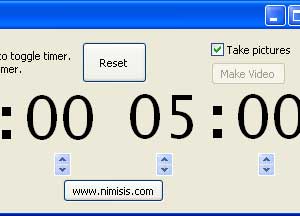
ChessClock is a software chess clock. It also can be used together with a digital camera or webcam to take a picture of the board after each move so that positions encountered during the game can be revisited.
User videos
FAQs
A1: Each player is limited to one minute.
A2: ChessClock is shareware, not freeware. Version 1.0 costs $10 for new users. (Please also read the notes on the column to the right if you intend to purchase ChessClock.)
A3: This depends on the resolution of the webcam. The pictures are compressed to Jpeg format which is ideal for photos in that it preserves fidelity but is also drastically smaller in size compared to other formats such as bitmaps (Bmp). A standard webcam resolution is 640x480 pixels and the typical filesize of such a photo would be of the order of 90KB.
A4: The mode most cameras default to when plugged into a computer's USB port is "Transfer Photo" mode, used to transfer snaps onto your computer. Most digital cameras do however also have "PC Cam" mode which lets you use it as a webcam.
A6: ChessClock could be used for any two-player game, such as; Go, Scrabble, Shogi etc.
A7: What ChessClock does is take the first imaging device in your registry and try to get images from it. If it can't find any image devices it will flash up a message box saying "can't find a webcam/camera." If a dark grey box is being shown, the webcam is probably not listed as the default device, it may instead be the graphics card for example. Now, try "My Computer", "properties", "device manager" and select the cross beside "sound, video and game controllers". The usb webcam should be listed here but perhaps along with other devices (like, an entry "Nvidia WDM Video Capture"). Check the properties of any such capture device and disable them (presumably they are not being used anyway) then the webcam should be bumped up to be the first capture device. ChessClock should then work properly!
A8: The current settings can be found in the registry (Start->run->type "regedit"->click OK) They are listed under
HKEY_LOCAL_MACHINE->SOFTWARE->Nimisis->ChessClock (pre-Vista) and Computer\HKEY_USERS\[some guid]\Software\Classes\VirtualStore\MACHINE\SOFTWARE\Nimisis\ChessClock (Vista and later). If you just installed ChessClock and cannot find the registry, try restarting your computer.CAM_REFwill usually be set to 0 but if a user has plugged multiple webcams in their machine in the past, the ID of the webcam in the windows registry might not be 0 (and they see a black window as described in Q8). In this case experimenting by setting this variable from 1 upwards should allow the user to find their webcam. If 1 through 15 fail then I would assume there is another problem/bug.DELAY_DELTAto be used in a later version.DELAY_TYPEto be used in a later version.DIRspecified the directory to store still images and time lapse videos.LTIMEtime in seconds for the left user.RTIMEtime in seconds for the right user.RESOLUTION_REFwhen set to0gives a resolution of 320x240. 1 gives 640x480. 2 gives 960x720. 3 gives 1024x768. Further resolutions have not yet been implemented yet (but if you need it get in touch).
A9: Yes, but a couple of customers did report problems with the license validation and having the default directory for saving frames set to drive C:\, though these were resolved. (Note that the registry key on newer versions of Windows is
Computer\HKEY_USERS\[some guid]\Software\Classes\VirtualStore\MACHINE\SOFTWARE\Nimisis\ChessClock. This can also be found using "Find" in regedit. If you just installed ChessClock and cannot find the registry, try restarting your computer.)A10: No, but there hopefully will be soon. A customer has reported being able to emulate Windows XP on Max OS X using a program called Parallels. VMWare should also do the trick.
A11: In short, yes. Contact us with details of what you need and we'll provide a quote.
A12: They should be saved in the save folder as ChessClock.exe. You may have to "run as administrator" when starting ChessClock.
Download Trial (.msi) Download Trial (.zip) Buy License for $10
A computer, an image capture device such as a digital camera or webcam (ChessClock can automatically detect and work with most image capture devices), and a video codec that will compress the final movie to a reasonable size. (Your PC will probably already have such a codec.)
Version 1.0 (released 31/03/11)
- Custom resolution support
- Timestamp option
Screenshot