Collusion
Collusion is an application that detects plagiarism. Ideal for teachers wanting to save time before reading through homework or develpers with source code, this software checks the texts within a directory for similarities. Any copying that has taken place can be found before spending any time reading the essays.
FAQs
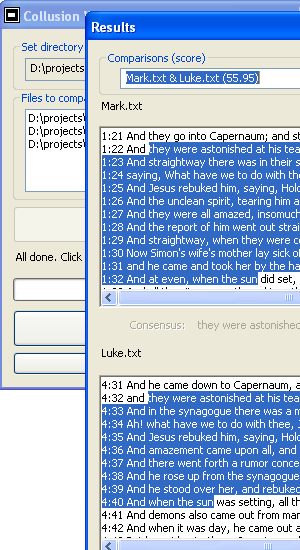
A3: Installation includes a directory called "small" (probably "C:/Program Files/Nimisis.com/Collusion/small") of 20+ small texts containing around 1500 words each. (These texts are chapters from Matthew and Mark's Gospels because they are known to contain similar sections.) Start Collusion and click browse, then select any of the files in the small directory. The contents of the folder will be shown in the list box. Click "Check" to start the calculation process. Once complete, the "See Similarities" button can be pressed which show the results. Select one from the list and the two texts will be displayed, with the similar areas highlighted. Note that each result also has a similarity score. The higher the score, the more likely some copying / plagiarism has taken place.
A folder called "large" is also included. This contains Matthew (~24K words), Mark (~15K words) and Luke (~26K words). Whereas, usually the trial version only compares the first 250 words of each text, it does allow the special case of having these three larger texts compared to each other.
A4: The current settings can be found in the registry (Start->run->type "regedit"->click OK) They are listed under HKEY_LOCAL_MACHINE->SOFTWARE->Nimisis->Collusion. (If you just installed Collusion and cannot find the registry, try restarting your computer.)
- Making
MUmore negative will focus the search to word mismatches.This is to be used in conjunction withDELTAand should be negative. It is set to -0.33 by default - Making
DELTAmore negative will focus the search on finding sequences of matching words. This is to be used in conjunction withMUand should be negative. It is set to -0.5 by default. - Each document is split up into groups of text with a maximum number of words.
NUM_WORDS_PER_GROUPINGsets this value. A higher number requires more RAM memory but with focus matches to the most relevant. A lower number will find more matches, however these could be less significant. Minimum recommended is 500, maximum 4000. The default is 1000.
A5: Yes, but a couple of customers did report problems with the license validation and having the default directory for saving frames set to drive C:\, though these were resolved. (Note that the registry key on newer versions of Windows is "Computer\HKEY_USERS\[some guid]\Software\Classes\VirtualStore\MACHINE\SOFTWARE\Nimisis\Collusion." This can also be found using "Find" in regedit. If you just installed Collusion and cannot find the registry, try restarting your computer.)
Download Trial (.msi) Download Trial (.zip) Buy License for $10
A computer.
Version 1.1 (released 01/04/08)
- Not just .txt files can be checked, but all of the following; .txt, .c, .cpp, .cxx, .cc, .csv, .tli, .tlh, .h, .hpp, .hxx, .hh, .inl, .rc, .resx, .idl, .asm, .inc, .vb, .resx, .xsd, .wsdl, .htm, .html, .aspx, .ascx, .asmx, .asax, .config, .asp, .asa, .css, .xml, .jsl, .java
- Note: there is also a free Word Document to Text converter available to download and install separately.
Version 1.0 (released 24/01/08)
- Compares documents against each other to spot similarities.
Screenshot