software | projects | photos | archive | about | contact | subscribe  RSS

 Home > Software > HTML2Image

HTML2Image

Delicious Reddit Digg Facebook StumbleUpon Twitter

HTML2Image is an application that saves a standard web page as an image file. The HTML code is rendered to common image formats such as png, gif or jpg.

Version 1.0 (released 10/09/09)

  • Saves URLs as images.

If you're interested in webcam software, you might like to make time lapse videos or long exposure photos, which can be useful for science experiments.

Requirements:

A computer with 200Mb of RAM

FAQs:

Q1: What limitations are there in the trial version?
Q2: How much does HTML2Image cost to buy?
Q3: How do I get started?
Q4: What settings can I specify and what do they do?
Q5: Does HTML2Image work with Windows Vista?
Q6: Is there a Mac version of HTML2Image?
Q7: This almost does what I want. Can I pay for some bespoke changes to be made?

Q1: What limitations are there in the trial version?
A1: Images will display a watermark.

Q2: How much does HTML2Image cost to buy?
A2: HTML2Image is shareware, not freeware. Version 1.0 costs $25. (Please also read the notes on the column to the right if you intend to purchase HTML2Image.)

Q3: How do I get started?
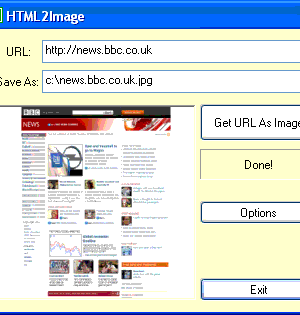
A3: Type in the URL of the web page you want to have rendered, change any settings such as the virtual browser size and resulting image size, then press "Get URL As Image".

Q4: What settings can I specify and what do they do?
A4: The current settings can be found in the registry (Start->run->type "regedit"->click OK) They are listed under HKEY_LOCAL_MACHINE->SOFTWARE->Nimisis->HTML2Image.

  • BROWSER_HEIGHT and BROWSER_WIDTH change the dimensions of the web page that will be captured.
  • IMAGE_HEIGHT and IMAGE_WIDTH determine the final image dimensions.

Q5: Does HTML2Image work with Windows Vista?
A5: Yes, but a couple of customers did report problems with the license validation and having the default directory for saving frames set to drive C:\, though these were resolved. (Note that the registry key on Vista is "Computer\HKEY_USERS\[some guid]\Software\Classes\VirtualStore\MACHINE\SOFTWARE\Nimisis\HTML2Image." This can also be found using "Find" in regedit.)

Q6: Is there a Mac version of HTML2Image?
A6: No, but there hopefully will be soon. A customer has reported being able to emulate Windows XP on Max OS X using a program called Parallels. VMWare should also do the trick.

Q7: This almost does what I want. Can I pay for some bespoke changes to be made?
A8: In short, yes. Contact us with details of what you need and we'll provide a quote.

HTML2Image [comments]

download softwareDownload Now [Mirror]
Free download 5.1MB
[pad file for download sites]

($25 to buy)

A Paypal account is not required to buy a license. Credit cards are accepted. Before completing your order please first read the instructions below the screenshot.

Screenshot:

Purchase via the "Buy Now" button above. This takes you to the Paypal website where you can pay $25. (Payment via credit card is also accepted by Paypal.) PayPal then immediately notifies our database that the transaction has taken place. Please then retrieve your license by going to this page with your Paypal transaction email address and the two lines of info obtained from the License Info button on the Purchase HTML2Image dialog box that pops up when you start HTML2Image. This info contains your hard drive serial number and is used to encode the license. Note that the license, and therefore a fully functional version of HTML2Image will only work on that one computer. For multi-user licenses (i.e. more than 10) please contact us.

Problems? Try the FAQs and the Google Group (see below) first. Comments, like suggestions for the next version are very welcome.

Google Groups Beta
Subscribe to Nimisis Software
Email:
Visit this group

Related tags

,