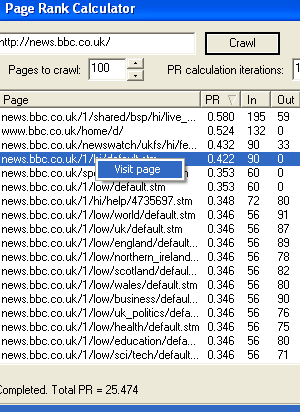
If you're asking yourself "How can I improve my website's Google PageRank?", then you've come to the right place. Ranker is a webmaster tool, more specifically a PageRank calculator that enables you to analyse how your website is interlinked, thus allowing you to change the design and ultimately increase its ranking.
Perhaps there should be hyperlinks to one part of the website on the homepage or there are too many links on another page, causing "PageRank leakage." Ranker produces a quantifiable result showing you whether your incremental changes have helped produce a more search engine friendly site. Ranker also checks for dead links and informs you how far each page is from the front page.
Webmasters out there may also be interested in real time website visitor tracking.
Version 1.3 (released 01/04/08)
- Return code for pages (e.g. 404 not found) are shown so doubles as a dead link finder.
- Better link finding.
- How far each page is from the front page ("depth") returned.
A computer and an internet connection.
Q1: How do I analyse a particular website?
Q2: What limitations are there in the trial version?
Q3: How much does Ranker cost to buy?
Q4: What is a good value for the final PR?
Q5: Why is this process so slow?
Q6: What do the columns mean?
Q7: Why is the PR value different from what I see in my Google Toolbar?
Q8: How does Google's PR algorithm work?
Q9: This almost does what I want. Can I pay for some bespoke changes to be made?
Q1: How do I analyse a particular website?
A1: Type the website into the field (remembering to add "http://" at the front) then press "Crawl". Once the specified number of pages have been scanned, an iterative calculation is performed to produce a final value for how the website in interlinked.Q2: What limitations are there in the trial version?
A2: Only 10 pages can be crawled from the desired website and the PR calculation will only be iterated three times.Q3: How much does Ranker cost to buy?
A3: Version 1.0 costs $5. (Please also read the notes on the column to the right if you intend to purchase Ranker.)Q4: What is a good value for the final PR?
A4: This depends on how many pages are crawled and how many PR calculation iterations are performed. In testing several "search engine optimised" websites I've found that a final value of 25 after crawling 100 pages (with 10 iterations) is a very good result. Feel free to add in the comments section your findings and use that as a small forum for discussing results.Q5: Why is this process so slow?
A5: The speed of your internet connection will have a direct effect on how long it takes to calculate the PR of a website. There is also an artificial delay of two seconds between page scans integrated into the application so that the server is not put under too much stress, effectively subjecting it to a small Denial of Service (DoS) attack.Q6: What do the columns mean?
A6: The page column is obviously the page URL. PR is the calculated PageRank contribution from the local pages. "In" are the number of links coming into the specific page and "Out", the number of links leaving the page.Q7: Why is the PR value different from what I see in my Google Toolbar?
A7: The PR is the calculated PageRank contribution from the local pages and is a relative measure. Contributions from inlinks of other websites are not available (as unfortunately Nimisis.com is not a large search engine and does not have those resources at its disposal).Q8: How does Google's PR algorithm work?
A8: See this page.Q9: This almost does what I want. Can I pay for some bespoke changes to be made?
A9: In short, yes. Contact us with details of what you need and we'll provide a quote.
Ranker [comments 1]
| Download Now [Mirror] Free download 0.2MB [pad file for download sites] |
A Paypal account is not required to buy a license. Credit cards are accepted. Before completing your order please first read the instructions below the screenshot.
Screenshot:

Purchase via the "Buy Now" button above. This takes you to the Paypal website where you can pay $5. (Payment via credit card is also accepted by Paypal.) PayPal then immediately notifies our database that the transaction has taken place. Please then retrieve your license by going to this page with your Paypal transaction email address and the two lines of info obtained from the License Info button on the Purchase Ranker dialog box that pops up when you start Ranker. This info contains your hard drive serial number and is used to encode the license. Note that the license, and therefore a fully functional version of Ranker will only work on that one computer.
Problems? Try the FAQs first. Comments, like suggestions for the next version are very welcome.
Related tags