Recorder
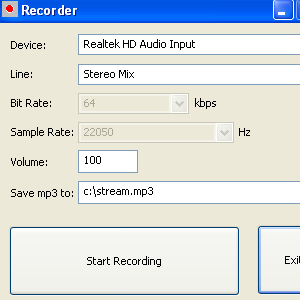
Recorder is an application that saves the audio being streamed on your PC to mp3.
FAQs
A1: Only low quality mp3s can be made. The bitrate and sample frequency are fixed.
A2: Recorder costs $20. (Please also read the notes on the column to the right if you intend to purchase Recorder.)
A3: Select the options, such as which sound device and line to record from, volume and the file to save to, then press "Start Recording".
A4: The current settings can be found in the registry (Start->run->type "regedit"->click OK) They are listed under
HKEY_LOCAL_MACHINE->SOFTWARE->Nimisis->Recorder (If you just installed Recorder and cannot find the registry, try restarting your computer.).DEVICEchanges the sound device from which sound will be captured.LINEdetermines the specific line from the device to record from.FILEsets the output mp3 file.
A5: Yes, but a couple of customers did report problems with the license validation and having the default directory for saving frames set to drive C:\, though these were resolved. (Note that the registry key on newer versions of Windows is:
Computer->HKEY_USERS->[some guid]->Software->Classes->VirtualStore->MACHINE->SOFTWARE->Nimisis->Recorder
(This can also be found using "Find" in regedit. If you just installed Recorder and cannot find the registry, try restarting your computer.)
A6: No, but there hopefully will be soon. A customer has reported being able to emulate Windows XP on Max OS X using a program called Parallels. VMWare should also do the trick.
A8: In short, yes. Contact us with details of what you need and we'll provide a quote.
Download Trial (.msi) Download Trial (.zip) Buy License for $5
A computer and an internet connection.
Version 1.3 (released 01/04/08)
- Return code for pages (e.g. 404 not found) are shown so doubles as a dead link finder.
- Better link finding.
- How far each page is from the front page ("depth") returned.
Screenshot